


Understanding your CalPERS health benefits doesn’t have to be complicated. Whether you’re an active employee or a retiree, this guide provides tools, resources, and answers to common questions so you can quickly find clear, accurate information when you need it.
Start Here: Active Members and Retirees
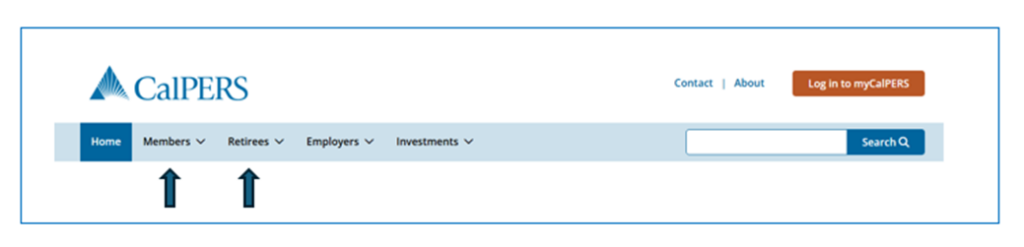
The CalPERS home page is your starting point to access information about your health plans, coverage details, and other resources. Simply select the Members tab if you’re currently working, or Retirees tab if you’re enjoying retirement.
Active Members
Health Benefits — Find information about eligibility, plan options, life events, and Open Enrollment, which is September 14 through October 9, 2026. You can also access forms, publications, and additional resources.
Retirees
Health & Medicare — Explore retirement health eligibility, Medicare options and requirements, Open Enrollment (September 14 through October 9), dependent eligibility verification, and the Complementary Annuitant Premium Program (CAPP), which helps cover health plan costs if your retirement allowance falls short, along with additional resources.
Find What You Need Fast With the CalPERS Search Bar
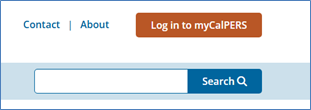
Use the search bar to quickly find specific information on the website. Simply type in keywords such as Medicare, Open Enrollment, or Health Benefit Summary.
Log In to Your myCalPERS Account
Your myCalPERS account is the best place to view and manage your current health benefits. You can:
- Review your coverage details, premiums, and enrolled dependents
- Change plans when eligible
- Use the Health Plan Search tool to compare plans available in your ZIP code and check provider availability.
Frequently Asked Questions
From starting a new job to getting married, having children, moving, or retiring, life events can impact your health care decisions any time of year. To help you navigate these changes, we’ve compiled answers to frequently asked questions about managing your CalPERS health coverage.
1. Understanding Your Options
Where can I find personalized health benefit information?
If you’re looking for details on your current CalPERS health plan, there are several ways to access this information:
- Log in to myCalPERS to view your plan details, including:
- Premiums and out-of-pocket costs
- Covered dependents
- Visit the Forms & Publications webpage to access key documents to help you understand your health benefits:
- Evidence of Coverage (EOC)
- Summary of Benefits and Coverage (SBC)
- CalPERS Glossary of Health Care Terms
Who manages my dental and vision benefits?
Dental and vision benefits vary depending on whether you’re an active employee or a retiree. These may also vary if you are a public agency member. Find details on the Dental & Vision Benefits page.
What is a dental or vision rider?
Certain Medicare plans offer dental and/or vision coverage for an additional fee, which is billed directly to members by the health plan, separate from their monthly health premium. This is an option available to Public Agency or Schools Medicare members only through the following health plans. Refer to the Evidence of Coverage documents for additional information or contact the plan directly.
- Anthem Medicare Preferred PPO w/ Dental/Vision
- Blue Shield Medicare PPO with Dental/Vision
- Kaiser Permanente Senior Advantage with Dental & Kaiser Permanente Senior Advantage Summit with Dental
- Sharp Direct Advantage HMO with Dental
- UnitedHealthcare Group Medicare Advantage PPO with Dental/Vision
How can I determine which health plans are available to me?
Some health plans are only available in certain counties and ZIP codes. If you’re considering changing your coverage or moving, use the Health Plan Search by ZIP Code tool or log into myCalPERS account to use the Search Health Plans tool for a customized experience. In the Search Health Plans tool, you can compare the health plans premiums, benefits, and copays side by side for up to three health plans.
2. Making Changes to Your Health Plan
CalPERS’ 2026 Health Open Enrollment runs September 14 through October 9. This is your annual opportunity to make changes to your health benefits without a qualifying life event. Review Annual Health Plan Changes to learn about 2027 health plan changes and visit Plans & Rates at the end of July to find preliminary premiums.
Can I change my health plan outside of Open Enrollment?
You may change your health benefits outside of Open Enrollment if you experience a qualifying life event, such as:
- Loss of Coverage: If your health benefits were canceled due to an involuntary loss of coverage, you must provide proof that your previous coverage ended.
- Relocation: If you move, you may select a health plan available in your new location.
- Retirement: You have a 60-day window from your retirement date to change your health plan.
- Medicare Eligibility: When you become eligible for Medicare, you may choose a new CalPERS Medicare health plan.
If you experience a qualifying life event, you have 60 days from the date of the life event to submit your request. You can make changes directly in myCalPERS, but if you are an active employee, be sure to check with your employer before making changes in myCalPERS.
Visit the Eligibility & Enrollment for Active Members and Eligibility & Enrollment for Retirees webpages and review the When You Can Change Your Health Plan section in the Health Program Guide (PDF) for more information on making changes to your health plan outside of Open Enrollment.
3. Coverage When Traveling
What if I need medical care while traveling?
Emergency services and urgent care are covered nationwide under all CalPERS health plans.
PPO Platinum members typically have access to nationwide provider networks and may seek care outside of California.
Members should confirm coverage details with their health plan before traveling. Our article, Know Your Health Care Coverage Before You Go provides helpful tips prior to your travel.
For plan-specific information, check your Evidence of Coverage (EOC) or Summary of Benefit (SBC). These can be accessed on the Forms & Publications page.
4. Medicare and Retirement Health Benefits
How can I ensure that my medical benefits roll into retirement?
If you are already enrolled in CalPERS health benefits and you retire within 30 days of your separation date, your benefits will automatically transition into retirement. If you wish to decline coverage, you must indicate this on your retirement application. Review the When You Are Retiring Section on page 26 of the Health Program Guide (PDF) for more information. For more information visit our CalPERS YouTube channel for the step-by-step guide to Medicare enrollment & CalPERS health.
Do I need to enroll in Medicare to keep my CalPERS health benefits?
Yes. If you and/or your dependent are over 65, retired, and eligible for premium-free Medicare Part A, you must also enroll in Medicare Part B, to continue your CalPERS health benefits. Learn more in the How to Keep Your CalPERS Health Coverage After Turning 65, section of the Medicare Enrollment Guide (PDF) and view the CalPERS Quick Tip, Medicare: Eligibility and Ineligibility video on our website.
Why did I receive an invoice for the Medicare Part B premium?
Medicare Part B requires a monthly premium, which can be deducted from your Social Security benefits or billed directly by Medicare. You must pay for and maintain enrollment in Medicare Part B to remain enrolled in the CalPERS health program.